Spade Farm
Feature deep-dive
Every dairy runs a continuous experiment on itself. You switch to new-crop silage, move a group, change a milking shift, add a fan bank — dozens of changes a year, each one rippling through intake, components, cell count and breeding for weeks afterward. Almost none of it gets written down. So three weeks later, when milk is off two pounds and the nutritionist asks what happened, the answer is a group effort of remembering. Farm Timeline is the place to stop remembering and start looking it up.

Log any operational change — ration, pen, equipment, labor, weather event — as a dated event on your farm's timeline
Pick a category and Spade Farm automatically loads the KPIs that change usually moves
Pick an impact window — 7, 14, 21 or 30 days — and see each metric before the change versus after, with the direction and size of the move
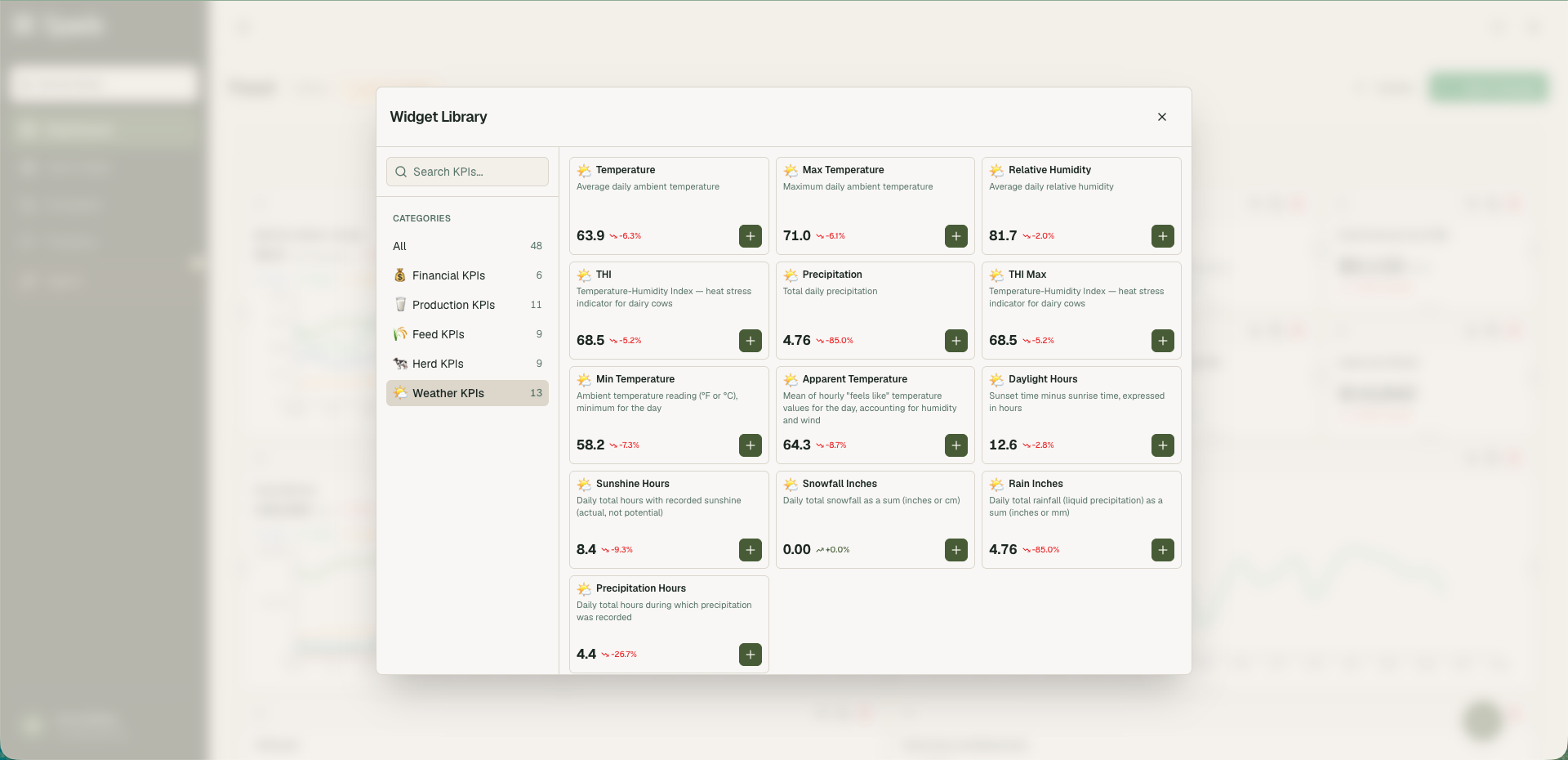
Add any other KPI you want from the full catalog: feed, herd, production, financial and weather
This view pulls the relevant data together so you can see what changed and when, without digging through reports. It shows correlation, not causation, so read the section on interpreting results before making a decision.
Timeline and calendar views, filterable by category, so a year of changes is browsable
The hardest question on a dairy isn't "what's my number." It's "why did my number move."
Most farms can answer the first one now. Milk per cow, dry matter intake, components, somatic cell count, income over feed cost — the data is there, and Spade Farm puts it in one daily picture. But a number on its own doesn't tell you anything actionable. Intake down 1.2 pounds means nothing until you know that you started feeding the new pile eight days ago, moved forty head the week before that, and had four days over a THI of 78 in between.
That context lives in people's heads, in a whiteboard in the office, in a text thread with the nutritionist, and in nobody's records at all. And it decays fast. Ask anyone on a dairy what changed six weeks ago and you'll get a confident answer that's wrong by about ten days.
The problem gets worse the better your data gets. More KPIs, updated daily, means more movements to explain — and without a record of what you did, every movement is equally mysterious. Extension guidance on running a real on-farm trial is blunt about the discipline required:
"Alter only one factor at a time. Resist the temptation to over complicate the trial by seeking to address multiple questions simultaneously."
That's written for crop trials, but it transfers. Real dairies don't work that way, and they never will. But a dairy that at least logs its three simultaneous changes has something the dairy that logged nothing does not: a list of suspects.
That's what Farm Timeline is. Not a lab notebook — a list of suspects, with the numbers next to it.
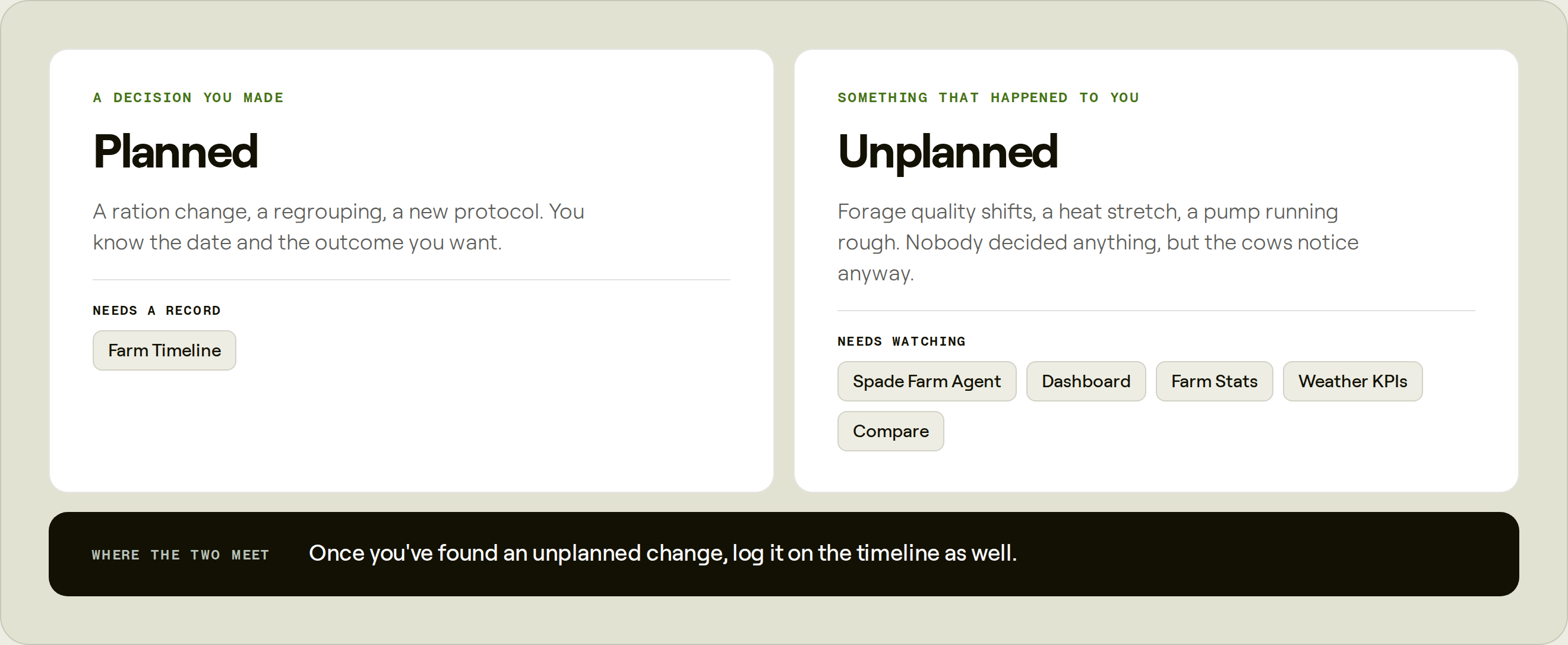
Timeline is a section of Spade Farm, alongside your Dashboard, Farm Stats and Compare. It does two things:
It's a log. Every operational change, event and decision on the farm, dated, categorized and scoped, in one browsable record that doesn't leave when the person who made the change does.
It's an analysis. For each logged event, Spade Farm pulls the KPIs most relevant to that kind of change and shows you how they moved in the window after it, compared against the same-length window before it.
The log is worth having on its own. The analysis is what makes people keep using it.
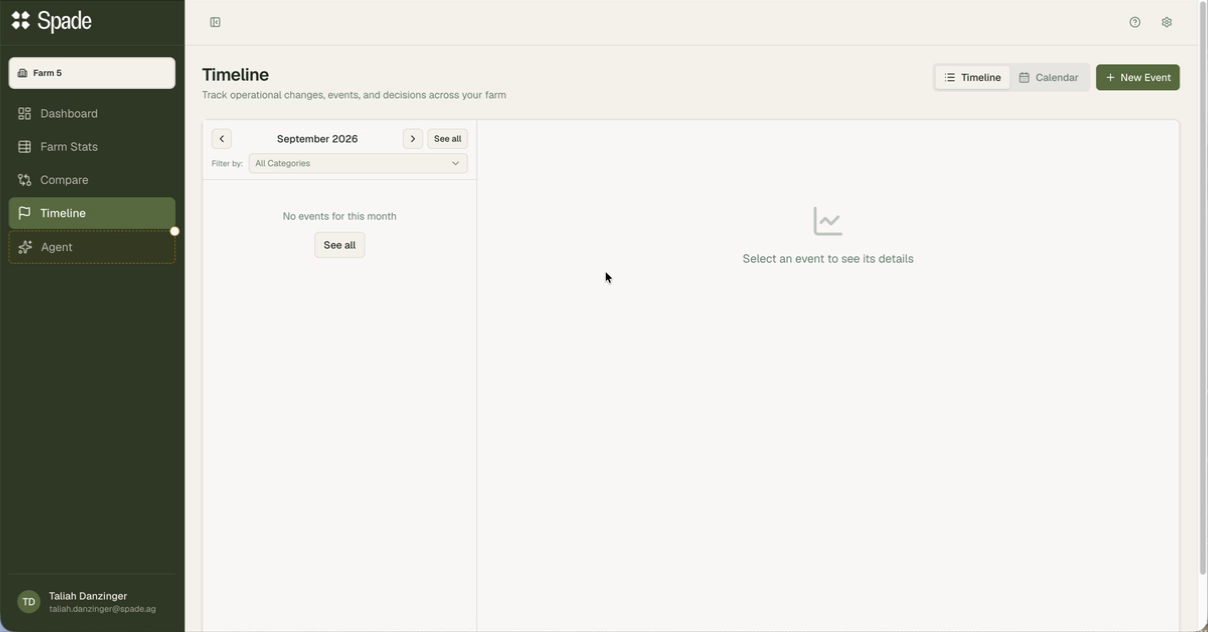
Click New Event. Five fields, and three of them carry more weight than they appear to.
Free text. "Ration Change." "Moved fresh pen." "New milker on second shift." Name it the way you'd say it out loud, because the person reading it in three months will be you.
Six categories:
Ration changes, new crop, forage swaps, additive changes, bunk management changes
Pen moves, regrouping, stocking density changes, protocol changes, breeding program changes
Parlor and milking equipment, vacuum and detach settings, fans and soakers, mixers, feed push-up
New hires, shift changes, training, turnover in a key role
Heat events, storms, mud, anything environmental worth marking
Everything else
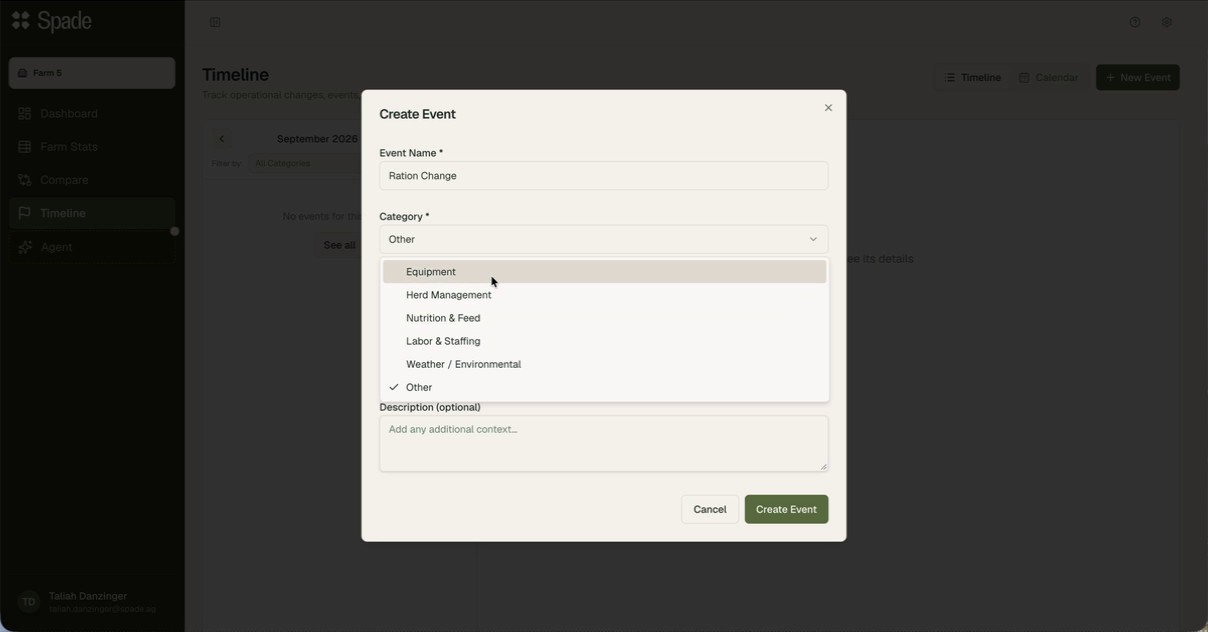
Category determines which metrics you see. Each one carries a preset set of KPIs — the numbers you'd expect that kind of change to move. Log a Nutrition & Feed event and Spade Farm loads the feed KPIs: dry matter intake, dry matter fed per head, feed cost per head per day, refusals. Log a Herd Management event and you get a different set.
This is the difference between a note-taking app and an analysis tool. You aren't asked to guess which KPI to watch; the category makes the reasonable guess for you, and you can add to it.
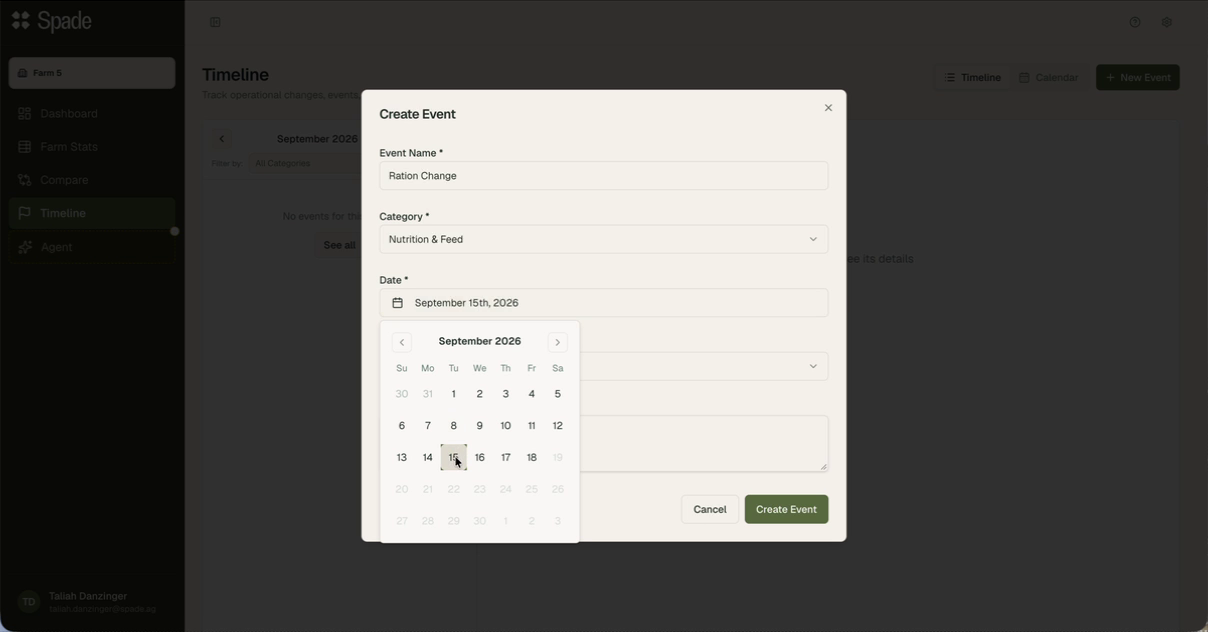
Backdate as far as you like. Useful for the obvious reason: most farms will start by entering the last few months of changes they still remember, which immediately makes the tool worth something instead of worth something in a year.
You can also date an event up to three days into the future. That's deliberate. If you know the ration change goes in tomorrow, log it now — because the version of you that's standing in the feed alley tomorrow is not going to stop and open a laptop. Logging ahead is the single habit that determines whether a farm's timeline stays complete.
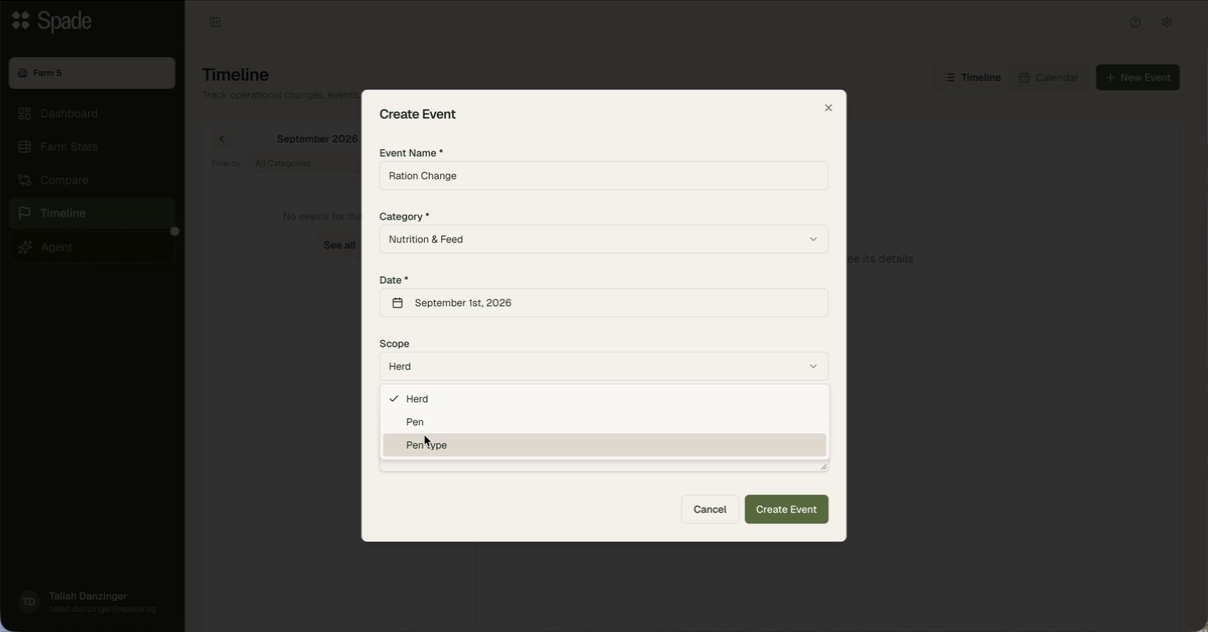
Three options: Herd, Pen, or Pen type.
If it's a whole-herd change, scope it to the herd. If it only touched the lactating cows, scope it to pen type. If it touched one group, scope it to that specific pen.
Keep in mind: narrowing the scope narrows the data available to analyze it.
Most farms can report milk at the bulk-tank or whole-herd level all day long. Reporting milk by pen requires individual cow milk weights, plus knowing which cows were in which pen on which day. If your operation doesn't collect individual weights, a pen-scoped event can't show you a milk response — because there isn't a pen-level milk number to show.
So there's a real tension. A ration change on trialing a feed additive in 3 specific pens genuinely is a pen level change, and scoping it accurately is the right call. But scope it accurately and the metrics you can see afterward are more restricted than they'd be at herd scope.
Practical rule: if a change touches most of the animals on the facility and you want the fullest metric picture, herd scope is defensible. If a change affects all milking cows, pen type will give you the best result. If a change touches one group and you'd mislead yourself by attributing a herd-level number to it, scope it down and accept the thinner read.
Optional, and worth filling in every time. "Ration Change" tells you nothing in six months. "New crop corn silage" tells you everything.
Create the event and the detail panel opens: category, date, name, description, and the analysis underneath.

Four options: 7d, 14d, 21d, 30d.
The window sets two matched periods — one before the event, one after — and every metric is compared between them. On a 7-day window for a September 1 event, that's Aug 25–Aug 31 before and Sep 2–Sep 8 after. Note that the day of the change is excluded from both. A day with a change happening in the middle of it isn't a clean before or a clean after, and including it would drag both averages toward each other.
Wider windows average over more days, which cuts noise but also blurs a sharp effect and pulls in more of everything else that happened. Two practical notes:
A window can't outrun your data. Pick 14d for an event four days ago and there's nothing there yet. The panel fills in as days accumulate — it isn't broken, it's early. This is normal and expected for any event you log going forward, as opposed to backfilled.
Match the window to the biology, not to your patience. More on this below, but the short version: the best range for comparison is based on the type of change made on the dairy.
Each KPI gets a tile: the percentage change, the absolute change in the metric's own units, a sparkline with the before period in grey and the after period in color, and the before and after values spelled out — 57.9 lbs/head/day → 56.7 lbs/head/day, down 1.2 lbs, down 2.1%.
Tiles with insufficient data say so — "Not enough data" — rather than showing you a number built from three observations. A metric your farm doesn't currently feed into Spade won't populate at all. If a category you'd expect is empty, that's an integration status question, not a Timeline question.
The presets are a starting point. Add metrics opens the full catalog — searchable, grouped into Financial, Production, Feed, Herd and Weather KPIs — and anything you add starts populating for that event.
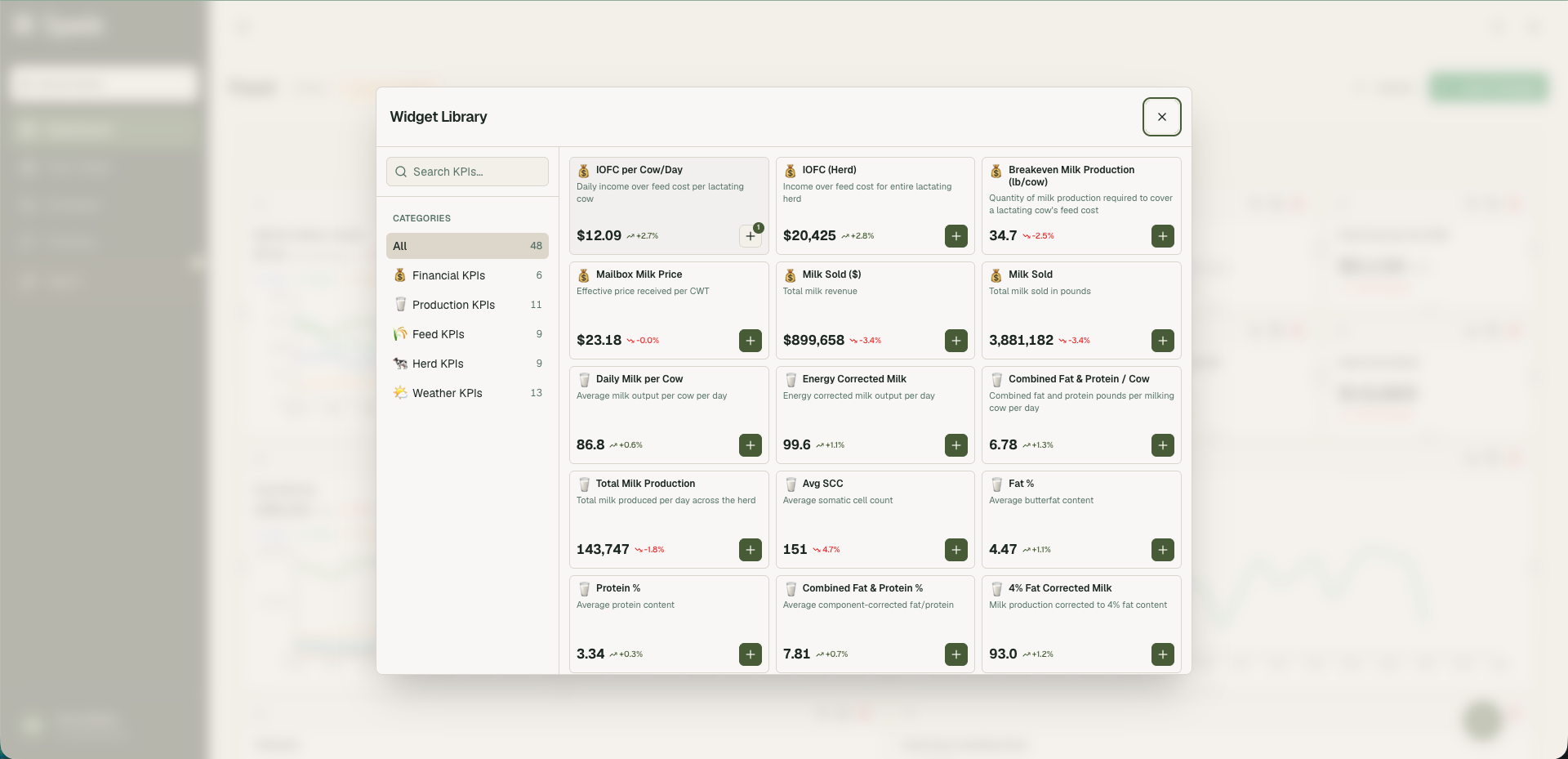
Add liberally. A ration change is a feed event by category, but if you suspect it moved components or cell count, put those tiles on the same screen. The whole value of this feature is having the suspect and the evidence in one view.
Farm Timeline shows you the change in metric values before and after an event. It does not prove that the event caused the change in metric values.
Nutrition & Feed
Ration Change
"New crop corn silage"
September 13
A before/after comparison on one farm points to a possible effect. It doesn't prove one. In on-farm research, what counts is the number of pens compared, not the number of cows. When you compare one group to its own past, there's no second group to check against and no repeat of the test. That makes it hard to separate your change from everything else that happened during the same window.The most common way a clean-looking before/after read goes wrong is that something else changed too. Weather, where the group sits in lactation, a new load of forage, a different person on feeding that week. In a 7-day window on a working dairy, your logged change is rarely the only thing that moved.A number can also move in the wrong direction for the right reason. A 2025 study of milker training on US dairies found that clinical mastitis cases rose in the week after training. Read as a simple before/after, that looks like the training hurt. What actually happened is that better-trained milkers caught more of the cases that were already there, and the herds' bulk tank SCC, which had been climbing, leveled off. The raw comparison and the underlying cause pointed in opposite directions.Use the before/after view to decide what's worth watching or testing further, and look at it alongside what else was going on at the farm during that window. Used that way, Timeline helps in three ways.
It narrows the list of suspects. When milk is off and you have a timeline, you're choosing between four logged changes instead of guessing across an entire quarter.
It shows you which changes didn't do what you expected. An event where nothing moved is useful information, especially when the change was expensive.
It builds the farm's record over time. One event is an anecdote. Four years of logged ration changes, each with the metrics from the weeks after, gives a single dairy its own evidence base.
Somatic cell count
weeks
Heat stress weakens immune function and increases exposure to environmental pathogens. Bulk tank SCC generally peaks in late summer. Compare SCC against THI from several weeks earlier; three weeks is a reasonable starting point.
One thing we want to say plainlyConception rate
immediately and 40 to 60 days later
Heat reduces fertility right away through weaker estrus expression and higher early embryonic loss. It also damages follicles that are still developing. A follicle takes about six weeks to grow from the early antral stage to ovulation, and heat effects on the oocyte can carry over for two to three estrous cycles. As a result, conception rates stay low for 40 to 60 days after the weather cools. This is a major contributor to lower fall conception rates and a reason to keep cooling running into September. Compare conception rate against THI from about six weeks earlier.
One thing we want to say plainly
a year or more
Dry cows exposed to heat stress produce an average of 10 lb/day less milk in the following lactation. Their daughters, exposed to heat in utero, produce about 5.1 kg/day (roughly 11 lb/day) less milk in their first lactation. They are also less likely to survive to first calving: 71% compared with 83% for daughters of cooled dams. Lower milk yield in these daughters continues for at least three lactations. Dry cow cooling is a high-return investment, and its benefits do not appear in same-season data.
When a Timeline result is important enough to spend money on, the next step is a proper comparison: two comparable pens in the same season, not one pen against its own last month.
The best event in the dairy year to run all the way through
Nutrition & Feed
Ration Change
"New crop corn silage"
September 13
Corn silage in the Upper Midwest comes off the field in September, and the standard advice is to give it at least four months in the bunker before feeding it. Silage keeps improving in storage, especially the starch, so the longer it sits, the more the cow gets out of it.
That's the goal, but it isn't always possible. In a drought year, when haylage inventory is tight, a farm may open the new corn silage bunker weeks after harvest instead of months to stretch the haylage and balance future inventories.
When that happens, the cows are eating corn silage at its least digestible point. The ration looks the same on paper, but the cow is getting less out of it.
This is where the Timeline window is useful. Log the day you switch to new-crop silage and let the event run the full window. You'll see what intake, milk, and components did in the weeks after the switch on your farm, alongside whatever else changed during that time.
Now the part that determines your impact window. Not every KPI reports this at the same speed. In a controlled trial that deliberately induced milk fat depression with a low-fiber, high-oil diet — a sharper change than a silage swap, but the clearest published response curve there is — milk fat percentage moved by day 3 and fat yield by day 5, then held roughly a third below control from day 9 through day 21. Dry matter intake dropped and stayed down from day 6 through day 21. And milk volume showed no significant treatment effect at all across the whole trial. Intake and components are your leading indicators. The bulk tank weight is the last place a feed change shows up, and sometimes it never does.
Rumen adaptation research points the same way: bacterial populations shift over 3 to 9 days, fermentation over 4 to 11, voluntary intake over 9 to 13 — with a 14-day adaptation period the general recommendation.
So: for a silage transition, the 7-day window is a partial story. It captures the disruption and none of the settling. Look at 14d and 21d as well.
Metrics to put on that event: the feed presets get you dry matter intake, dry matter fed per head, feed cost per head per day and refusals. The presets will also give you milk fat percent and milk yield — the earliest and sharpest signal — plus milk per cow and income over feed cost, since a digestibility drop shows up as more feed buying less milk. Refusals are worth watching closely; a change in what's left in the bunk along with what is consumed can be a strong signal.
It narrows the list of suspects. When milk is off and you have a timeline, you're choosing between four logged changes instead of guessing across an entire quarter.
It narrows the list of suspects. When milk is off and you have a timeline, you're choosing between four logged changes instead of guessing across an entire quarter.
It narrows the list of suspects. When milk is off and you have a timeline, you're choosing between four logged changes instead of guessing across an entire quarter.
Somatic cell count
weeks
Heat stress weakens immune function and increases exposure to environmental pathogens. Bulk tank SCC generally peaks in late summer. Compare SCC against THI from several weeks earlier; three weeks is a reasonable starting point.
One thing we want to say plainlyConception rate
immediately and 40 to 60 days later
Heat reduces fertility right away through weaker estrus expression and higher early embryonic loss. It also damages follicles that are still developing. A follicle takes about six weeks to grow from the early antral stage to ovulation, and heat effects on the oocyte can carry over for two to three estrous cycles. As a result, conception rates stay low for 40 to 60 days after the weather cools. This is a major contributor to lower fall conception rates and a reason to keep cooling running into September. Compare conception rate against THI from about six weeks earlier.
One thing we want to say plainly
a year or more
Dry cows exposed to heat stress produce an average of 10 lb/day less milk in the following lactation. Their daughters, exposed to heat in utero, produce about 5.1 kg/day (roughly 11 lb/day) less milk in their first lactation. They are also less likely to survive to first calving: 71% compared with 83% for daughters of cooled dams. Lower milk yield in these daughters continues for at least three lactations. Dry cow cooling is a high-return investment, and its benefits do not appear in same-season data.
When a Timeline result is important enough to spend money on, the next step is a proper comparison: two comparable pens in the same season, not one pen against its own last month.
Two ways to look at the same record.
Timeline view is the working view: events in a list down the left, detail and analysis on the right. Navigate month to month, or See all for the full history.
Calendar view lays the month out as a grid with events on their dates. This is the view for seeing density and coincidence — the week where three things happened at once, the stretch where nothing was logged. Click any event to jump to its analysis, or create a new one from here.
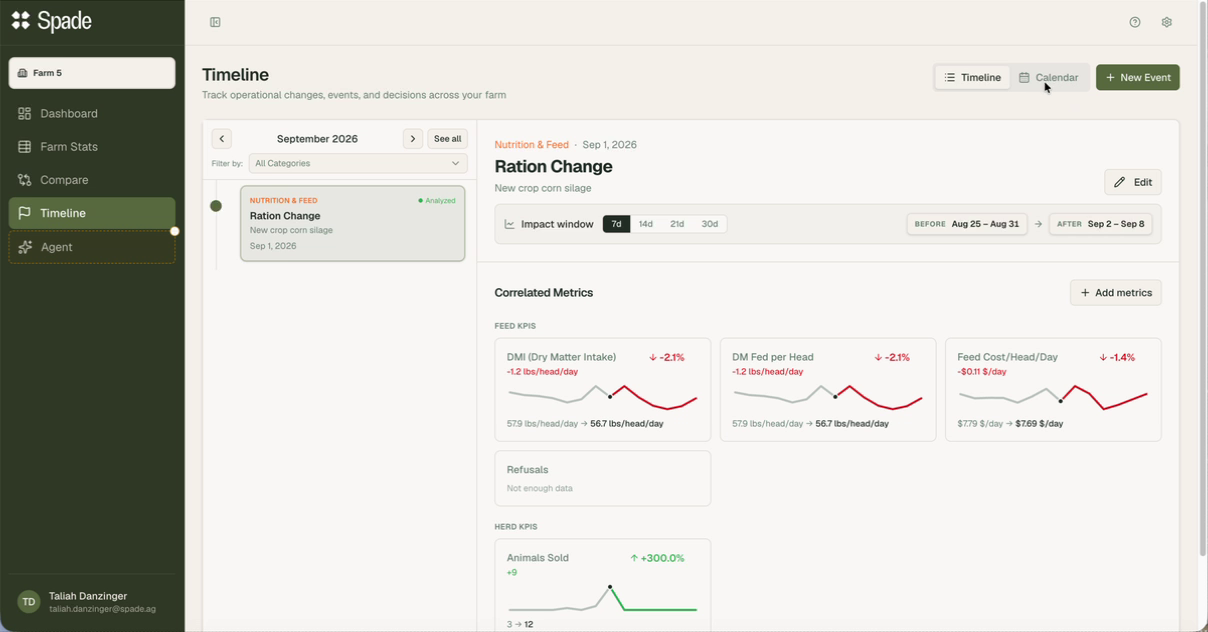
Filter by category in either view. Reviewing feed decisions with your nutritionist? Filter to Nutrition & Feed and you have the agenda.
Covered above, and worth repeating here because it's the limit that matters most.
Tiles populate from connected systems. A herd that isn't fully integrated will see partial results or empty categories — that's an onboarding status, and your Spade contact can tell you exactly which sources are live.
Pen-scoped milk analysis needs individual cow milk weights tied to pen assignments. No weights, no pen-level milk read.
No integration writes these events for you. The value of a timeline is a direct function of the discipline of keeping it — which is the argument for the three-day forward dating and for making the habit somebody's actual job.
If you switched silage and moved the fresh pen on the same Monday, Timeline will faithfully show you both events against the same moved numbers and take no position on which one did it. Neither will anyone else.
A log of operational changes, events and decisions on your dairy — ration changes, pen moves, equipment changes, staffing changes — paired with an automatic before-and-after view of how your KPIs moved around each one.
Anything, in six categories: Nutrition & Feed, Herd Management, Equipment, Labor & Staffing, Weather / Environmental, and Other. The category determines which KPIs load automatically for the analysis.
Yes, up to three days ahead. If tomorrow's ration change is decided today, enter it today — that's the habit that keeps a timeline complete.
As far as you want. Backfilling the changes you remember from the last few months is a good way to start, since the analysis runs against data you already have.
Either the window extends past the data you have — normal for a recent event, and it fills in as days accumulate — or the data source for that metric isn't connected yet for your farm.
Pen-level milk analysis requires individual cow milk weights matched to pen assignments. Without those, milk can only be read at herd or pen type level. Scope to the herd if the change was herd-wide.
No — and it's important to be clear about it. Timeline shows correlation: what moved, in the window around what you did. A single farm comparing itself to its own past has no control group. Use it to narrow down what to investigate.
Yes, and they can add ration change events as a trusted advisor to your farm – cutting out the middleman and giving everyone access to the power of the data.
Your Spade contact can walk your own timeline with you — backfill the changes you remember and look at the numbers around them together.
Advise dairies for a living? Nutritionists, vets and consultants use Spade Consultant to keep the same change log across every client herd, in the same units and the same calculations.